1
2
3
4
5
6
7
8
9
10
11
12
13
14
15
16
17
18
19
20
21
22
23
24
25
26
27
28
29
30
31
32
33
34
35
36
37
38
39
40
41
42
43
44
45
46
47
48
49
50
51
52
53
54
55
56
57
58
59
60
61
62
63
64
65
66
67
68
69
70
71
72
73
74
75
76
77
78
79
80
81
82
83
84
85
86
87
88
89
90
91
92
93
94
95
96
97
98
99
100
101
102
103
104
105
106
107
108
109
110
111
112
113
114
115
116
117
118
119
120
121
122
123
124
125
126
127
128
129
130
131
132
133
134
135
136
137
138
139
140
141
142
143
144
145
146
147
148
149
150
151
152
153
154
155
156
157
158
159
160
161
162
163
164
165
166
167
168
169
170
171
172
173
174
175
176
177
178
179
180
181
182
183
184
185
186
187
188
189
190
191
192
193
194
195
196
197
198
199
200
201
202
203
204
205
206
207
208
209
210
211
212
213
214
215
216
217
218
219
220
221
222
223
224
225
226
227
228
229
230
231
232
233
234
235
236
237
238
239
240
241
242
243
244
245
246
247
248
249
250
251
252
253
254
255
256
257
258
259
260
261
262
263
264
265
266
267
268
269
270
271
272
273
274
275
276
277
278
279
280
281
282
283
284
285
286
287
288
289
290
291
292
293
294
295
296
297
298
299
300
301
302
303
304
305
306
307
308
309
310
311
312
313
314
315
316
317
318
319
320
321
322
323
324
325
326
327
328
329
330
331
332
333
334
335
336
337
338
339
340
341
342
343
344
345
346
347
348
349
350
351
352
353
354
355
356
357
358
359
360
361
362
363
364
365
366
367
368
369
370
371
372
373
374
375
376
377
378
379
380
381
382
383
384
385
386
387
388
389
390
391
392
393
394
395
396
397
398
399
400
401
402
403
404
405
406
407
408
409
410
411
412
413
414
415
416
417
418
419
420
421
422
423
424
425
426
427
428
429
430
431
432
433
434
435
436
437
438
439
440
441
442
443
444
445
446
447
448
449
450
451
452
453
454
455
456
457
458
459
460
461
462
463
464
465
466
467
468
469
470
471
472
473
474
475
476
477
478
479
480
481
482
483
484
485
486
487
488
489
490
491
492
493
494
495
496
497
498
499
500
501
502
503
504
505
506
507
508
509
510
511
512
513
514
515
516
517
518
519
520
521
522
523
524
525
526
527
528
529
530
531
532
533
534
535
536
537
538
539
540
541
542
543
544
545
546
547
548
549
550
551
552
553
554
555
556
557
558
559
560
561
562
563
564
565
566
567
568
569
570
571
572
573
574
575
576
577
578
579
580
581
582
583
584
585
586
587
588
589
590
591
592
593
594
595
596
597
598
599
600
601
602
603
604
605
606
607
608
609
610
611
612
613
614
615
616
617
618
619
620
621
622
623
624
625
626
627
628
629
630
631
632
633
634
635
636
637
638
639
640
641
642
643
644
645
646
647
648
649
650
651
652
653
654
655
656
657
658
659
660
661
662
663
664
665
666
667
668
669
670
671
672
673
674
675
676
677
678
679
680
681
682
683
684
685
686
687
688
689
690
691
692
693
694
695
696
697
698
699
700
701
702
703
704
705
706
707
708
709
710
711
712
713
714
715
716
717
718
719
720
721
722
723
724
725
726
727
728
729
730
731
732
733
734
735
736
737
738
739
740
741
742
743
744
745
746
747
748
749
750
751
752
753
754
755
756
757
758
759
760
761
762
763
764
765
766
767
768
769
770
771
772
773
774
775
776
777
778
779
780
781
782
783
784
785
786
787
788
789
790
791
792
793
794
795
796
797
798
799
800
801
802
803
804
805
806
807
808
809
810
811
812
813
814
815
816
817
818
819
820
821
822
823
824
825
826
827
828
829
830
831
832
833
834
835
836
837
838
839
840
841
842
843
844
845
846
847
848
849
850
851
852
853
854
855
856
857
858
859
860
861
862
863
864
865
866
867
868
869
870
871
872
873
874
875
876
877
878
879
880
881
882
883
884
885
886
887
888
889
890
891
892
893
894
895
896
897
898
899
900
901
902
903
904
905
906
907
908
909
910
911
912
913
914
915
916
917
918
919
920
921
922
923
924
925
926
927
928
929
930
931
932
933
934
935
936
937
938
939
940
941
942
943
944
945
946
947
948
949
950
951
952
953
954
955
956
957
958
959
960
961
962
963
964
965
966
967
968
969
970
971
972
973
974
975
976
977
978
979
980
981
982
983
984
985
986
987
988
989
990
991
992
993
994
995
996
997
998
999
1000
1001
1002
1003
1004
1005
1006
1007
1008
1009
1010
1011
1012
1013
1014
1015
1016
1017
1018
1019
1020
1021
1022
1023
1024
1025
1026
1027
1028
1029
1030
1031
1032
1033
1034
1035
1036
1037
1038
1039
1040
1041
1042
1043
1044
1045
1046
1047
1048
1049
1050
1051
1052
1053
1054
1055
1056
1057
1058
1059
1060
1061
1062
1063
1064
1065
1066
1067
1068
1069
1070
1071
1072
1073
1074
1075
1076
1077
1078
1079
1080
1081
1082
1083
1084
1085
1086
1087
1088
1089
1090
1091
1092
1093
1094
1095
1096
1097
1098
1099
1100
1101
1102
1103
1104
1105
1106
1107
1108
1109
1110
1111
1112
1113
1114
1115
1116
1117
1118
1119
1120
1121
1122
1123
1124
1125
1126
1127
1128
1129
1130
1131
1132
1133
1134
1135
1136
1137
1138
1139
1140
1141
1142
1143
1144
1145
1146
1147
1148
1149
1150
1151
1152
1153
1154
1155
1156
1157
1158
1159
1160
1161
1162
1163
1164
1165
1166
1167
1168
1169
1170
1171
1172
1173
1174
1175
1176
1177
1178
1179
1180
1181
1182
1183
1184
1185
1186
1187
1188
1189
1190
1191
1192
1193
1194
1195
1196
1197
1198
1199
1200
1201
1202
1203
1204
1205
1206
1207
1208
1209
1210
1211
1212
1213
1214
1215
1216
1217
1218
1219
1220
1221
1222
1223
1224
1225
1226
1227
1228
1229
1230
1231
1232
1233
1234
1235
1236
1237
1238
1239
1240
1241
1242
1243
1244
1245
1246
1247
1248
1249
1250
1251
1252
1253
1254
1255
1256
1257
1258
1259
1260
1261
1262
1263
1264
1265
1266
1267
1268
1269
1270
1271
1272
1273
1274
1275
1276
1277
1278
1279
1280
1281
1282
1283
1284
1285
1286
1287
1288
1289
1290
1291
1292
1293
1294
1295
1296
1297
1298
1299
1300
1301
1302
1303
1304
1305
1306
1307
1308
1309
1310
1311
1312
1313
1314
1315
1316
1317
1318
1319
1320
1321
1322
1323
1324
1325
1326
1327
1328
1329
1330
1331
1332
1333
1334
1335
1336
1337
1338
1339
1340
1341
1342
1343
1344
1345
1346
1347
1348
1349
1350
1351
1352
1353
1354
1355
1356
1357
1358
1359
1360
1361
1362
1363
1364
1365
1366
1367
1368
1369
1370
1371
1372
1373
1374
1375
1376
1377
1378
1379
1380
1381
1382
1383
1384
1385
1386
1387
1388
1389
1390
1391
1392
1393
1394
1395
1396
1397
1398
1399
1400
1401
1402
1403
1404
1405
1406
1407
1408
1409
1410
1411
1412
1413
1414
1415
1416
1417
1418
1419
1420
1421
1422
1423
1424
1425
1426
1427
1428
1429
1430
1431
1432
1433
1434
1435
1436
1437
1438
1439
1440
1441
1442
1443
1444
1445
1446
1447
1448
1449
1450
1451
1452
1453
1454
1455
1456
1457
1458
1459
1460
1461
1462
1463
1464
1465
1466
1467
1468
1469
1470
|
---
pagetitle: yummers
lang: en
---
# histogram-preserving tri-planar projection
31 March 2026
I've been messing around with Burley's "On Histogram-Preserving Blending for
Randomized Texture Tiling" ([link](https://jcgt.org/published/0008/04/02/)) for
a couple days. The core idea is to pre-process images into a "Gaussianized"
form where the histogram of the image's colors follows a Gaussian distribution.
Once in Gaussian form, there is a closed-form way to blend multiple samples with
barycentric weights such that the Gaussian's variance is preserved (Equation 2
in the paper). Finally, you can run the blended colors through a lookup table
(LUT) to get a result in the original image's color space. The results are
outstanding. (These ideas build on those laid out by Heitz and
Neyret in an earlier paper. I will reference Heitz a few times.)

It was love at first sight - you can use this to seamlessly tile large areas
with textures that themselves don't even need to be seamless. However, the
method uses 4 taps per pixel (3 overlapping hexagons per pixel, plus 1 3D
lookup table tap).
I've been thinking about terrains for a week or two, since I need to make a
large-scale environment for a project. I really like the idea of using
tri-planar projection for grass, stone etc., but I've never been satisfied with
the quality I get from it. It always creates this awful loss of contrast
between layers and creates weird ghosting artifacts.
Wait a minute, isn't that kind of what Heitz's technique addresses?
It turns out that yeah, you can use the exact same machinery described by Heitz
and Burley to perform histogram-preserving tri-planar projection.
You just use standard tri-planar projection to get barycentric
coordinates instead of playing with a UV-space triangle grid. Results are shown
below.

I also noticed that the gamma term described in Burley's Equation 5 can
significantly reduce contrast. At low values, where ghosting is more visible,
contrast is better preserved; at high values, it's more diminished.

Perhaps blending in YCbCr would ameliorate the loss in contrast, but I haven't
tried that yet.
The astute reader might find that just increasing contrast after the blend
would produce a similar result, and I'm inclined to agree. The only possible
advantage that this method has is that it doesn't demand fine-tuning.
# using linux as a desktop os in 2026
9 Feb 2026
About a month ago, my PC's boot drive died. I had been running Windows 11 with
moderate dissatisfaction for a few months, so I decided to switch over to
Linux as my primary OS. These are some notes on that process. My
motivation is to give an accurate portrayal of what to expect out of the
switching process and the day-to-day operation.
TLDR: The Linux desktop is *way* better in 2026 than it was in 2016. Native app
support is far more common, and Proton is really good. If dual booting was not
still necessary for VR, I would wholeheartedly recommend it.
## Dual boot setup
I knew immediately that I'd be dual booting. My memory told me that some apps
just would not work well, and the virtualization tax is high, so I'd want a
native Windows install. So I made my first mistake: I installed Linux, *then*
Windows. The opposite order is far more streamlined. So I just overwrote my
install with Win11. I left half my drive as unallocated space for the Linux
install.
After rebooting normally to make sure Windows was really working, it was time
to install Linux. My new install would not let me get into BIOS - my keyboard
inputs did not work. There are one-time flags you can set via shell (PowerShell
and BASH) to do various boot-related tasks without keyboard input. To get into
BIOS:
* PowerShell: `shutdown /r /fw /t 0`
* bash: `sudo systemctl reboot --firmware-setup`
My keyboard did work once in the BIOS, so I was then able to enter my Linux
bootable USB. I had some trouble getting the bootable USB to work. I had to
install the media via Rufus's `dd` mode instead of the default.
I installed my distro as normal in the unallocated space, then rebooted. GRUB
showed up, showing my Linux install as default and the Windows boot manager
below. Somewhat unsurprisingly, my keyboard didn't work in GRUB. I heard that
disabling fast boot and
[xhci](https://en.wikipedia.org/wiki/Extensible_Host_Controller_Interface)
handoff in the BIOS can help, but this only temporarily helped before the issue
resurfaced and then resolved itself. My current config has fast boot off and
xhci handoff off.
My solution to the pre-BIOS/GRUB keyboard issue is just to use shell commands
to reboot. To get from Windows to Linux, I just reboot as normal since Linux
has prio by default in my install. To go from Linux to Windows, I installed
`efibootmgr`, ran it to get the numeric ID of the Windows boot manager (0000),
then crafted this one liner:
* bash: `sudo efibootmgr --bootnext 0000 && reboot`
I use ctrl+R to find it every time I need to reboot.
> Sidebar: this method does not play nicely with Windows updates. Since
> Windows needs to reboot 19 times to do anything, and each reboot takes you
> into Linux, you'll be stuck booting back into Windows manually. Next time
> Windows demands an update, I'll probably just unplug my PC from the wall.
## Linux setup
I'm using the Ubuntu 2024 LTS as my distro. My first point of confusion getting
started was the apparent surfeit of package managers: apt (the standard),
snap (canonical's thing), and flatpak (some semi popular community thing).
snap and flatpak are sandboxed by default, which is really just a massive
fucking pain in the ass for GUI apps. So I use apt wherever possible, and raw
.deb files for the rest.
### Audio
Audio's a little scuffed, but seems like we've mostly gotten on the pulse audio
train (thank God).
For whatever reason, my motherboard's audio output sets itself to 39% volume. I
have to use `alsamixer` to increase this to 100%.
I used `pavucontrol` to disable irrelevant speakers and mics s.a. monitor speakers.
### Firefox
Firefox comes pre-installed on Ubuntu. Firefox is slowly going the way of
Windows, but [Just The Browser](https://justthebrowser.com/) has some easy one
liners to de-shittify it. Waterfox is also interesting, but I haven't tried it
yet.
### Discord
I used the raw .deb to install Discord. It will ask you to manually update
every few days. I wrote this shell script to speed that up:
```bash
#!/usr/bin/env bash
# updisc: update discord
set -o errexit
set -o xtrace
cd $HOME/Downloads
wget --content-disposition "https://discord.com/api/download/stable?platform=linux&format=deb"
latest=$(ls -v | grep discord | tail -n1)
sudo dpkg -i "$latest"
```
### Spotify
The snap works fine for this. Installed it through the App Center (Canonical's
app store).
(Preachy note: Spotify kind of sucks. Avoid using their auto generated
playlists. Spotify has something called the Perfect Fit Program which
commissions and pushes music to listeners based on non-public preference data.
Artists involved in this program are not well compensated. Read about it in Liz
Pelly's
[expose](https://harpers.org/archive/2025/01/the-ghosts-in-the-machine-liz-pelly-spotify-musicians/).)
### Steam
I use the raw .deb to install Steam. I tried the flatpak at first, but the
sandboxing doesn't play nicely with proton. Steam will keep itself up to date
so the raw .deb is fine.
### Games
I had some issues with graphics drivers in certain games and had to roll back
my driver from 590 to 570. You can list your driver with `nvidia-smi`, and
install some other version (e.g. 570) with `sudo apt install
nvidia-driver-570`. It will ask for a password - this only has to be entered
once after reboot, after which the driver will be trusted forever.
If your game uses Easy Anti Cheat and Proton, you'll need to install the Proton
EasyAntiCheat runtime. It should be listed in your library by default.
Proton has a heavy FPS hit vs. Windows native (like 30%), but I'm not a
competitive gamer and my computer is very over-built, so I don't care.
### Blender
I downloaded the LTS .tar.xz from the website and put it in my bin directory. I
think it's probably smarter to use Steam for this. Do *not* use the snap
version - it won't let you install addons from the web.
If you use an NDOF input device like a spacemouse, install
[spacenavd](https://github.com/FreeSpacenav/spacenavd) via apt. You might have
to relaunch blender.
Otherwise, pretty much identical experience.
### Unity
Superficially, Unity basically just works. Install the hub using the official
Unity3D [documentation](https://docs.unity3d.com/hub/manual/InstallHub.html#install-hub-linux).
My problems with Unity so far are:
* Slow shader compile times.
* Unity uses OpenGL by default on Linux, and Vulkan is very crashy in my
experience.
* OpenGL uses a different depth buffer format than DX11/DX12, making it hard
to develop for that platform on the OpenGL version.
* GPU profiler doesn't work out of the box, showing 1 ms for every frame.
* Weird permissions issues if you just mount a project created in Windows. Had
to copy it over.
* Have to delete Library/ if the project was created/used on Windows.
(Shouldn't be a big deal. Just slows down first time startup.)
* Slow scrolling performance in Inspector pane
* Dragging sliders in game mode is not smooth, like it is in Windows
You can use ALCOM/vrc-get to create VRChat projects. Get it [from
github](https://github.com/vrc-get/vrc-get).
### Adobe
I've already been on Krita (and GIMP before that), which natively supports
Linux. No problems there.
Substance painter is a massive issue. Adobe claims to have a native Ubuntu build,
and even sell it through Steam. However, it simply did not launch on my
system. It was missing half a dozen shared object files (.so), and after
manually fixing that it still fails to launch.
Thankfully the fuckwits at Adobe couldn't be bothered to strip their binary:
```
$ file ./Adobe\ Substance\ 3D\ Painter
./Adobe Substance 3D Painter: ELF 64-bit LSB pie executable, x86-64, version 1 (GNU/Linux), dynamically linked, interpreter /lib64/ld-linux-x86-64.so.2, for GNU/Linux 3.2.0, BuildID[sha1]=cf49a257fa3bcf0f40d860a8a45a67c873571421, with debug_info, not stripped
$ $ du -h ./Adobe\ Substance\ 3D\ Painter
305M ./Adobe Substance 3D Painter
```
So the next time I have a free afternoon I'll be looking through that.
I did try ArmorPaint, but it is very clearly still quite early in development.
I do not think that it's a viable alternative to Substance Painter yet. (For
example: you cannot drag and drop in textures, nor can you import more than one
at a time. Functional, sure, but barely.) To its credit: unlike Substance
Painter, it actually launches.
## Pleasant surprises
Linux is way, way more polished than I remember it. Back in college I was
fucking around with Arch (and didn't know what I was doing) so I was expecting
a far more painful setup process. Instead it was very seamless. Audio works
well. There are very few weird audio/graphical bugs. NVIDIA drivers are easy to
install. Gaming basically just works - I have yet to encounter a game which I
can't play (I've only tried maybe a dozen).
The amount of native app support is really heartwarming. Skipping over the big
apps like Firefox and Steam, here are some smaller apps I was surprised to see
native support for:
* OBS (video recording/streaming tool)
* Factorio (indie game)
* r2modman (mod manager)
* Chatterino (twitch chat app)
* PureRef (artist reference app)
* Lorien (infinite canvas drawing app)
## Complaints
Canonical uses the "yes/maybe later" pattern which degrades the notion of
consent. Nearly every large firm does it now since Google about-faced a couple
years ago, but it is still a grave degradation of user rights that shouldn't be
glossed over.
SteamVR does not work for me. My knuckles did not have an internally
consistent coordinate system, preventing me from completing room
calibration.
I was never able to figure this out. This~~, along with Unity's crashy behavior
on Vulkan,~~* is what's keeping me from just deleting Windows.
\* I've actually been able to use the OpenGL build to do graphical programming
without issue for a few weeks now. So, not an issue.
## Conclusions
The Linux desktop is really good. You should give it a try.
# hemi-octahedral impostors
14 Jan 2026
*Note: this blog post is only like half way complete. I may or may not circle
back to it. The stuff on octahedral mappings is all finished, but the
impostor application below is not.*
Ryan Brucks published [an
article](https://shaderbits.com/blog/octahedral-impostors) describing
"octahedral impostors" in 2018. The basic idea is to to take photos of some
subject at octahedral lattice points, record them to an atlas, then reconstruct
those photos in a particle.

## But why octahedrons?
The octahedral mapping is simply one way to convert between a flat coordinate
system and a spherical coordinate system. It is notable because it does not use
any trig functions, making it suitable for use in realtime graphics.
This is what an octahedron looks like:

It is a polyhedron with 8 triangular faces and 6 vertices. The equator is a
square.
Let's work out how we'd convert this octahedron to a plane.
First, we project the upper hemisphere onto the xz plane:

Next, we effectively need to "rotate" the triangles in the lower half around
those diagonal edges. We can cheat by first *reflecting* the bottom vertex of each
triangle about its diagonal edge:

Finally, we can just project those points in the lower hemisphere onto the xz
plane:

Viewed head on, we can see a very beautifully symmetric unwrapping:

Note that we never actually did any rotations, so there no trig! Here's the
same procedure in code:
```c
// Convert unit octahedron to a [-1,1] x [-1,1] patch on xz plane.
float3 octahedron_to_plane(float3 p) {
if (p.y >= 0) {
// Project upper hemisphere onto xz plane.
p.y = 0;
return p;
}
// First, reflect the lower hemisphere's points about their diagonal.
p.x = sign(p.x) * (1 - abs(p.x));
p.z = sign(p.z) * (1 - abs(p.z));
// Then project onto the xz plane.
p.y = 0;
return p;
}
```
We can generalize this procedure to unwrap *any* spherical object by just
switching norms:
```c
// Convert unit sphere to a [-1,1] x [-1,1] patch on xz plane.
float3 octahedron_to_plane(float3 p) {
// Switch from L2 to L1 norm. This basically bends a sphere to an octahedron.
float l1_norm = abs(p.x) + abs(p.y) + abs(p.z);
p /= l1_norm;
// Then unwrap.
if (p.y < 0) {
p.x = sign(p.x) * (1 - abs(p.x));
p.z = sign(p.z) * (1 - abs(p.z));
}
p.y = 0;
return p;
}
```
Here's a quick demo showing what that norm conversion does to a unit sphere:

Going from plane to octahedron is just the same thing backwards:
```c
// Convert a [-1,1] x [-1,1] patch on xz plane to a unit sphere.
float3 plane_to_octahedron(float3 p) {
float l1_norm = abs(p.x) + abs(p.z);
if (l1_norm > 1) {
// Reflect lower hemisphere's point about their diagonal.
p.x = sign(p.x) * (1 - abs(p.x));
p.z = sign(p.z) * (1 - abs(p.z));
}
p.y = 1 - l1_norm;
return normalize(p);
}
```
If you'd like more discussion on this topic, I recommend the spherical geometry section in [the PBR book](https://www.pbr-book.org/4ed/Geometry_and_Transformations/Spherical_Geometry#x3-OctahedralEncoding).)
## The hemi octahedron
We might only want to map the upper hemisphere to a plane. In that case, we can
first note that in the standard octahedral mapping, the inner diamond of the
[-1,1] x [-1,1] square gets mapped to the upper hemisphere. So all we have to
do is first remap our input to that diamond via a scale and 45 degree rotation, map it,
then rotate it back. The code is still very simple:
```c
// Convert unit sphere to a [-1,1] x [-1,1] patch on xz plane.
float3 hemi_octahedron_to_plane(float3 p) {
// Rotate 45° and scale to fit square into diamond
float x_rot = (p.x + p.z) * 0.5;
float z_rot = (p.z - p.x) * 0.5;
p.x = x_rot;
p.z = z_rot;
float l1_norm = abs(p.x) + abs(p.y) + abs(p.z);
p /= l1_norm;
if (p.y < 0) {
p.x = sign(p.x) * (1 - abs(p.x));
p.z = sign(p.z) * (1 - abs(p.z));
}
p.y = 0;
// Rotate back.
x_rot = p.x - p.z;
z_rot = p.x + p.z;
p.x = x_rot;
p.z = z_rot;
return p;
}
```
Here is that transform, visualized:

If we didn't do that scale and rotate, this is what it would look like:

I will leave the plane -> hemi-octahedron code as an exercise for the reader.
## Impostor v1
With this mapping, we can write some code to spawn cameras at the lattice
points of an octahedral-mapped hemisphere, pointing in at some target object,
and generate an atlas of images taken at different angles:


We can then write a naive particle shader which computes its nearest lattice
point and simply renders that image.
We can simply compute the direction from the camera to the particle's center,
map that to 2D using the hemi-octahedral mapping, then find the nearest lattice
point by rounding. We can also rotate the particle to the same orientation that
the photo was taken at to avoid any weird behavior when viewed top down.
That looks like this:

The popping is pretty awful! Can we do better?
## Impostor v2
Brucks describes a "virtual frame projection" method. I'll let him explain it:
> Looking back to the 'virtual grid mesh' above, we can see that for any triangle on the grid, it has 3 vertices. So if we want to blend smoothly across this grid, we need to be able to identify the 3 nearest frames. And remember how using a sprite caused messed up projection of just one frame? Well it turns out the same thing happens when you try to reuse the projection from one frame for another! This is a pain. So you actually have to render a virtual frame projection for the other 2 frames to simulate their geometry. While using the mesh UVs for one projection and 'solving' the other two does work, it falls apart for lower (~8x8) frame counts because the angular difference can be so great between cards that you see the card start to clip at grazing angles (not shown in any videos yet). As a compromise, the shader does not use ANY UVs right now. It solves all 3 frames using virtual frame projection in the vertex shader and then uses a traditional sprite vertex shader. The only downside is at close distances you occasionally see some minor clipping on the edge but it is much more acceptable this way.
Lost? Me too! I found this paragraph extremely confusing - it's what motivated
me to write this article.
As near as I can tell, what he's describing is that you retrieve
the nearest 3 lattice points and do a barycentric interpolation. He's also
trying to clarify that you can't just use the uvs from one lattice point to
sample another - you have to calculate each lattice point's uvs separately.
(I suppose that that level of optimization-first thinking is required when
you're building for Fortnite!)
You then render the blended color that on a standard facing quad primitive.
To start, I calculate the ray from the camera to the origin of the particle's
coordinate system. I use that position for my barycentric interpolation.
That looks like this:

Huh. Looks a lot worse than his demo. What are we doing wrong?
Could it just be our choice of mesh that makes our results look bad? Here's Suzanne:

Maybe it looks a little better?
The mesh that Brucks shows off in his blog post has radial symmetry and smooth
normals, which might be responsible.
You can also see some artifacts appearing in open space. This was caused by a
couple things:
1. The other mesh was toggled on when I generated my impostor atlas.
2. The bounding sphere around my mesh had very little padding.
3. The particle can rotate, and if you don't clip the parts outside the
impostor's bounding sphere, you can wind up rendering them.
3 is crucial - with that correction in place, you can pack your atlas
pretty tightly. Here's Suzanne with that correction in place:

Here's the atlas. Pretty tight packing - could probably be optimized a little
further though:

## Impostor v3
After stepping away for a bath, the issue occurred to me.
I was calculating the lattice point based on the direction from the camera to
the particle center. With barycentric interpolation in place, we would be
better off using a per-pixel ray intersection with the impostor's bounding
sphere. Concretely: we want to sample the lattice points whose cameras have a
direction most closely matching the standard view direction. This is found by
simply going from the particle's bounding sphere origin to the surface along
`-viewDir`, projecting that to 2d, then rounding to lattice points as normal.
This seems to help a bit, but it's not night and day. I didn't capture any
videos here, but the next gen uses this tech.
## Impostor v4
So far we've only been rendering pre-lit images of our subject on an unlit
particle. Can we do better? What if we captured the albedo, normal, metallic
gloss, and position, then lit it with a standard surface shader?
The results look a bit better - specular is much better approximated now:

## Impostor v5
I continued to spin my wheels for a couple days. I re-read Brucks' article
several more times, and came to a couple conclusions:
1. He is using the camera-origin ray, not a per pixel view direction ray.
2. He is doing some form of parallax occlusion mapping to limit popping.
I found his description on
[this video](https://www.youtube.com/watch?v=6rsXe6kKTC4) useful:
> This version blends the three nearest frames using a single parallax offset (similar to a bump offset). This is the version of impostors used in FNBR on PC and Consoles. It was used on mobile originally but switched back to single frame at last minute since we were compositing them into HLODs and thus rendering lots of them.
That single parallax offset is explained by this image:
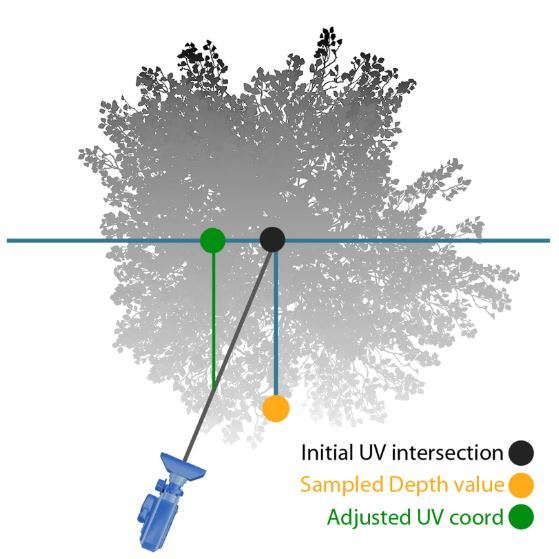
My buggy implementation looks promising - see how the eyes are much sharper
now?

It is still very, very poppy, unlike Brucks' demo. I must be doing something
wrong.
*Note: I stepped away from this project and don't plan to revisit it soon. If I
do, I'll post updates in a followup and link to it from here.*
# 6 wave dispersion relations with derivatives
21 Sep 2025
Tessendorf's 2005 paper
"[Simulating Ocean Water](https://people.computing.clemson.edu/~jtessen/reports/papers_files/coursenotes2004.pdf)"
describes three basic dispersion relations:
1. The deep water dispersion relation:
$$
\omega^2 = gk
$$
where $\omega$ is the wave's temporal frequency in $\text{rad}/s$, $g$ is gravity
in $m/s^2$, and $k$ is the spatial frequency in $m/s$.
2. The shallow water dispersion relation:
$$
\omega^2 = gk \tanh kh
$$
where $h$ is the water mean depth in $m$.
3. The deep water relation with viscosity correction:
$$
\omega^2 = gk (1 + k^2 L^2)
$$
where $L$ is the scale in $m$ at which the viscosity term operates. At 0,
it has no effect.
Horvath's 2015 paper
"[Empirical directional wave spectra for computer graphics](https://dl.acm.org/doi/10.1145/2791261.2791267)"
formulates the viscosity term in terms of different physical units, and applies
it to the shallow water dispersion relation:
$$
\omega^2 = (gk + \frac{\sigma}{\rho} k^3) \tanh kh
$$
where $\sigma$ is the surface tension in $N/m$, and $\rho$ is the water density
in $kg/m^3$.
It is useful to have derivatives of the dispersion relation. Horvath's paper
describes how we can calculate the spectrum term $S(k_x, k_y)$ from
$S(\omega, \theta)$ and the derivative of the dispersion relation
$\frac{\partial \omega}{\partial k}$:
$$
S(k_x, k_y) = S(\omega, \theta) \frac{\partial \omega}{\partial k} / k
$$
So, with that motivation, we would like the derivatives of our dispersion
relations. You should autodifferentiate if that's an option. If not, here are
derivations of each derivative:
1. Deep water:
$$
\begin{align*}
\omega^2 &= gk \\
\omega &= (gk)^\frac{1}{2} \\
\frac{\partial \omega}{\partial k} &= \frac{1}{2} (gk)^{-\frac{1}{2}} g \\
&= \frac{g}{2\sqrt{gk}} \\
&= \frac{1}{2} \sqrt{\frac{g}{k}}
\end{align*}
$$
Wolfram [here](https://www.wolframalpha.com/input?i=d%2Fdk+%28%28gk%29%5E%281%2F2%29%29).
2. Shallow water:
First we will need $\frac{\partial}{\partial k} \tanh kh$:
$$
\begin{align*}
\frac{\partial}{\partial k} \tanh kh
&= \frac{\partial}{\partial k} [\frac{e^{kh} - e^{-kh}}{e^{kh}+e^{-kh}}] \\
&= \frac{\partial}{\partial k} [(e^{kh} - e^{-kh})(e^{kh}+e^{-kh})^{-1}] \\
&= (he^{kh}-he^{-kh})(e^{kh}+e^{-kh})^{-1} +
(e^{kh}-e^{-kh})[-(e^{kh}+e^{-kh})^{-2}(he^{kh}-he^{-kh})] \\
&= h(1-[\frac{e^{kh}-e^{-kh}}{e^{kh}+e^{-kh}}]^2 \\
&= h(1-\tanh^2 kh)
\end{align*}
$$
With that identity, let's proceed:
$$
\begin{align*}
\omega^2 &= gk \tanh kh \\
\omega &= (gk \tanh kh)^{\frac{1}{2}} \\
\frac{\partial \omega}{\partial k} &= \frac{1}{2} [gk \tanh kh]^{-\frac{1}{2}} [g \tanh (kh) + gkh(1 - \tanh ^2 kh] \\
&= \frac{g(\tanh kh + kh(1 - \tanh ^2 kh))}{2 \sqrt{gk \tanh kh}} \\
&= \frac{g \tanh kh + gkh (1 - \tanh^2 kh)}{2 \sqrt{gk \tanh kh}} \\
&= \frac{1}{2} [\sqrt{g \tanh kh} + \frac {gkh(1 - \tanh^2 kh)}{\sqrt{gk \tanh kh}}] \\
&= \frac {g \tanh kh + gkh(1 - \tanh^2 kh)}{2\sqrt{gk \tanh kh}} \\
&= \frac {g (\tanh kh + kh \operatorname{sech}^2 kh)}{2\sqrt{gk \tanh kh}}
\end{align*}
$$
Wolfram [here](https://www.wolframalpha.com/input?i=d%2Fdk+%5Bsqrt%28gk+tanh+%28kh%29%29%5D).
(Recall that $\operatorname{sech}^2 x = 1 - \tanh^2 x$.)
3. Viscous deep water (Tessendorf version):
$$
\begin{align*}
\omega^2 &= gk [1 + k^2 L^2] \\
\omega &= (gk [1 + k^2 L^2])^{\frac{1}{2}} \\
\frac{\partial \omega}{\partial k} &= \frac{1}{2}(gk [1 + k^2 L^2])^{-\frac{1}{2}} [g+3gk^2 L^2] \\
&= \frac{g+3gk^2L^2}{2\sqrt{gk[1+k^2L^2]}}
\end{align*}
$$
Wolfram [here](https://www.wolframalpha.com/input?i=d%2Fdk+%5B%28gk+%281+%2B+%28k%5E2%29+%28L%5E2%29%29%29+%5E+%281%2F2%29%5D).
4. Viscous deep water (Horvath version):
$$
\begin{align*}
\omega^2 &= gk + \frac{\sigma}{\rho}k^3 \\
\omega &= (gk + \frac{\sigma}{\rho}k^3)^{\frac{1}{2}} \\
\frac{\partial \omega}{\partial k} &=
\frac{1}{2}(gk + \frac{\sigma}{\rho}k^3)^{-\frac{1}{2}} [g+3\frac{\sigma}{\rho}k^2] \\
&= \frac{g + 3 \frac{\sigma}{\rho}k^2}{2 \sqrt{gk+\frac{\sigma}{\rho}k^3}}
\end{align*}
$$
Wolfram [here](https://www.wolframalpha.com/input?i=d%2Fdk+%5B%28gk%2Bs%28k%5E3%29%2Fp%29%5E%281%2F2%29%5D).
5. Viscous shallow water (Tessendorf version):
FYI - use the Horvath version instead. This relation sucks.
We'll want $\frac{\partial}{\partial k} \sqrt{\tanh kh}$:
$$
\begin{align*}
\frac{\partial}{\partial k} \sqrt{\tanh kh}
&= \frac{\partial}{\partial k} (\tanh kh)^{\frac{1}{2}} \\
&= \frac{1}{2} (\tanh kh)^{-\frac{1}{2}} \frac{\partial}{\partial k} \tanh kh \\
&= \frac{1}{2} (\tanh kh)^{-\frac{1}{2}} h(1 - \tanh^2 kh) \\
&= h \frac{1 - \tanh^2 kh}{2 \sqrt{\tanh kh}} \\
&= h \frac{\operatorname{sech}^2 kh}{2 \sqrt{\tanh kh}}
\end{align*}
$$
Now we can proceed:
$$
\begin{align*}
\omega^2 &= gk (1 + k^2 L^2) \tanh kh \\
\omega &= (gk (1 + k^2 L^2) \tanh kh)^{\frac{1}{2}} \\
\frac{\partial \omega}{\partial k}
&= (\frac{\partial}{\partial k} [gk (1 + k^2 L^2)]) \tanh kh +
[gk (1 + k^2 L^2)] \frac{\partial}{\partial k} \tanh kh \\
&= \frac{g (3 + k^2 L^2)}{2 \sqrt{k} \sqrt{g (1 + k^2 L^2)}} \dots \\
&= \frac{1}{2} \sqrt{\frac{g(3+k^2 L^2)}{k}} \sqrt{\tanh kh} +
\sqrt{gk (1+k^2 L^2)} [\frac{h (1 - \tanh^2 kh)}{2 \sqrt{\tanh kh}}]
\end{align*}
$$
We can apply some transformations to get a common denominator and agree
with Wolfram:
$$
\begin{align*}
\frac{\partial \omega}{\partial k}
&= \frac{g (3 + k^2 L^2)}{2 \sqrt{gk(1+k^2 L^2)}} \sqrt{\tanh kh} + \dots \\
&= \frac{g (3 + k^2 L^2) \tanh kh}{2 \sqrt{gk(1+k^2 L^2) \tanh kh}} + \dots \\
&= \dots + \sqrt{gk (1+k^2 L^2)} [\frac{h (1 - \tanh^2 kh)}{2 \sqrt{\tanh kh}}] \\
&= \dots + \frac{gk(1+k^2 L^2)}{\sqrt{gk(1+k^2 L^2)}} [\frac{h (1 - \tanh^2 kh)}{2 \sqrt{\tanh kh}}] \\
&= \dots + \frac{gk(1+k^2 L^2) h (1 - \tanh^2 kh)}{2 \sqrt{gk(1+k^2 L^2) \tanh kh}} \\
&= \dots + \frac{ghk(1+k^2 L^2)(1-\tanh^2 kh)}{2 \sqrt{gk(1+k^2 L^2) \tanh kh}} \\
&= \frac{g(3+k^2L^2) \tanh kh + ghk(1+k^2 L^2)(1-\tanh^2 kh)}{2 \sqrt{gk(1+k^2 L^2) \tanh kh}} \\
&= \frac{g(3+k^2L^2) \tanh kh + ghk(1+k^2 L^2)(\operatorname{sech}^2 kh)}{2 \sqrt{gk(1+k^2 L^2) \tanh kh}}
\end{align*}
$$
Wolfram [here](https://www.wolframalpha.com/input?i=d%2Fdk+%5Bsqrt%28gk+%281+%2B+%28k%5E2%29%28L%5E2%29%29+tanh+%28kh%29%29%5D).
6. Viscous shallow water (Horvath version):
$$
\begin{align*}
\omega^2 &= (gk + \frac{\sigma}{\rho}k^3) \tanh kh \\
\omega &= ((gk + \frac{\sigma}{\rho}k^3) \tanh kh)^{\frac{1}{2}} \\
\frac{\partial \omega}{\partial k}
&= [\frac{\partial}{\partial k}(gk + \frac{\sigma}{\rho}k^3)] \tanh^{\frac{1}{2}} kh +
(gk + \frac{\sigma}{\rho}k^3)^{\frac{1}{2}} \frac{\partial}{\partial k} \tanh^{\frac{1}{2}} kh \\
&= [\frac{1}{2}(gk+\frac{\sigma}{\rho}k^3)^{-\frac{1}{2}}(g+3\frac{\sigma}{\rho}k^2)] \tanh^{\frac{1}{2}} kh +
(gk + \frac{\sigma}{\rho}k^3)^{\frac{1}{2}}h\frac{1-\tanh^2 kh}{2 \sqrt{\tanh kh}}
\end{align*}
$$
Let's try to corral this into a form closer to what Wolfram gives us:
$$
\begin{align*}
\frac{\partial \omega}{\partial k}
&= [\frac{1}{2}(gk+\frac{\sigma}{\rho}k^3)^{-\frac{1}{2}}(g+3\frac{\sigma}{\rho}k^2)] \sqrt{\tanh{kh}} +
(gk + \frac{\sigma}{\rho}k^3)^{\frac{1}{2}}h\frac{1-\tanh^2 kh}{2 \sqrt{\tanh kh}} \\
&= \frac{g+3\frac{\sigma}{\rho}k^2}{2\sqrt{gk+\frac{\sigma}{\rho}k^3}} \sqrt{\tanh{kh}} + \dots \\
&= \frac{(g+3\frac{\sigma}{\rho}k^2) \tanh{kh}}{2\sqrt{(gk+\frac{\sigma}{\rho}k^3)\tanh{kh}}} + \dots \\
&= \dots + (gk + \frac{\sigma}{\rho}k^3)^{\frac{1}{2}}h\frac{1-\tanh^2 kh}{2 \sqrt{\tanh kh}} \\
&= \dots + (gk + \frac{\sigma}{\rho}k^3)h\frac{1-\tanh^2 kh}{2 \sqrt{(gk + \frac{\sigma}{\rho}k^3) \tanh kh}} \\
&= \dots + \frac{h (gk+\frac{\sigma}{\rho}k^3) (1 - \tanh^2 kh)}{2 \sqrt{(gk+\frac{\sigma}{\rho}k^3)\tanh kh}} \\
&= \frac{(g+3\frac{\sigma}{\rho}k^2) \tanh{kh} + h (gk+\frac{\sigma}{\rho}k^3) (1 - \tanh^2 kh)}{2 \sqrt{(gk+\frac{\sigma}{\rho}k^3)\tanh kh}} \\
&= \frac{(g+3\frac{\sigma}{\rho}k^2) \tanh{kh} + h (gk+\frac{\sigma}{\rho}k^3) \operatorname{sech}^2{kh}}{2 \sqrt{(gk+\frac{\sigma}{\rho}k^3)\tanh kh}}
\end{align*}
$$
Wolfram [here](https://www.wolframalpha.com/input?i=d%2Fdk+%5B%28%28gk%2Bs%28k%5E3%29%2Fp%29tanh%28kh%29%29%5E%281%2F2%29%5D).
Divide numerator and denominator by $\rho$ (or p in wolfram) to make them
match.
# meow meow meow meow
10 Sep 2025
meow meow meow meow meow meow meow meow'meow meow meow meow meow. meow
meow meow meow.
## meow meow
* meow meow meow 3 meow meow 65 meow meow meow.
* 3% meow meow meow meow meow meow meow 3 meow.
* meow meow meow meow meow meow meow meow meow 65 meow.
* meow meow meow meow meow meow 1-10 meow meow meow.
* meow meow meow meow meow'meow meow meow meow meow meow-meow meow meow meow meow
meow meow meow meow. meow, meow meow meow meow meow meow meow.
* meow meow > 3 meow meow meow meow meow meow meow meow.
* meow meow meow meow meow 10 meow/meow^2 meow'meow meow. meow'meow meow
meow meow meow meow meow.
## meow, meow: meow meow meow meow meow (2007)
[meow meow meow.](meow://meow.meow.meow.meow/meow/meow/meow/meow43-48-meow2007.meow)
meow
* meow 1993, meow meow meow meow meow meow meow meow meow meow.
* meow 1997, meow meow meow meow meow 560 meow meow. 76% meow meow meow
meow meow. (meow'meow meow meow meow meow 1, meow 38)
* meow 2012, meow meow meow meow meow meow meow 30 meow meow.
* meow meow meow, meow meow meow 2, meow meow 2 meow meow
meow meow meow meow.
* meow 1 meow 4,000 meow meow meow meow meow meow (meow).
* meow meow meow meow 5% meow meow meow meow.
meow
* meow meow meow meow meow meow.
* meow meow meow meow meow meow meow meow meow meow.
* 25% meow meow meow meow meow meow meow meow 20meow meow 30meow.
* 25% meow meow meow meow meow meow meow. meow meow meow meow
meow meow.
meow meow meow
* 79%: meow meow meow
* 10%: meow meow
* 6%: meow meow
* 5%: meow meow
meow meow
* meow meow meow meow meow meow (meow)
* meow meow meow meow meow meow meow meow meow
* meow meow meow 1362 meow meow meow meow
* (meow: 1 meow/meow^2 meow meow meow 1 *meow*)
* meow meow meow meow 5 meow meow meow, 5 meow meow meow.
* meow meow meow 0-12 meow. meow meow meow.
* meow meow, meow meow meow meow meow meow meow meow meow 3 meow 65
meow.
* 49% meow meow meow meow meow meow meow 50 meow, meow meow meow meow
meow meow meow meow meow meow meow meow meow (meow meow meow
meow).
* meow meow meow meow meow meow meow meow meow.
* 67% meow meow meow meow meow meow meow meow meow meow.
* meow
meow meow
* meow meow meow meow meow
* meow meow meow meow meow meow meow meow meow meow meow meow meow
* meow meow meow meow meow meow
* meow meow meow meow 1-10 meow meow meow
* meow: meow 120 meow meow, meow meow meow meow meow meow 1200 meow meow 2400
meow *meow*. meow!
* meow meow meow meow meow meow 10-20 meow meow meow meow.
* meow meow meow meow meow meow meow meow.
meow meow
* meow meow > 3 meow meow meow meow meow meow meow 25% meow meow meow meow
meow.
* meow meow meow meow meow meow meow meow meow 10 meow meow meow.
* meow meow meow meow meow meow 3 meow meow meow meow *meow*.
## meow, meow: meow meow meow meow meow meow meow
meow (2002)
[meow meow meow.](meow://meow.meow/2001-150.meow)
meow
* meow 1 meow 6000 meow meow meow meow meow
* meow meow meow meow meow 7 meow 20 meow meow
* (meow meow meow meow meow meow meow)
* meow meow meow meow meow meow meow meow meow meow meow meow meow meow meow
meow meow meow meow meow meow, meow meow meow meow.
meow
* meow meow meow, meow meow-meow meow, meow meow meow meow meow
meow meow
* meow meow meow meow meow meow meow meow meow meow meow meow meow
meow meow meow meow meow meow 1 meow 50 meow. meow meow meow
meow meow meow (meow meow meow meow meow - 0% = meow meow, 100% =
meow meow meow meow) meow meow meow 50% (meow meow).
* meow meow meow. meow meow meow meow meow meow meow meow meow
meow meow meow 10 meow/meow^2 meow 200 meow/meow^2. meow 10meow/meow^2, meow meow meow
meow; meow 200 meow/meow^2, meow meow. "... meow meow meow meow meow meow
meow meow meow meow meow meow meow meow meow meow meow."
* meow meow 5 meow/meow^2 meow meow meow meow meow meow meow meow.
meow meow 20 meow/meow^2 meow meow meow meow meow meow meow 100 meow/meow^2.
* meow: meow meow = meow meow meow.
* meow meow meow meow meow meow meow meow meow meow meow,
meow 8.8% meow meow meow meow meow ~55% meow meow meow meow.
# rasterized ray marching at scale
11 Jun 2025
I've long had the dream of creating high resolution chains on characters with
raymarching. The problem is that Unity's object transform is based on the
character's hip bone, so making raymarched geometry "stick" to characters
is impossible.
The idea I've been toying with for a long time is to raymarch inside a
rasterized box. If you store information in that box's verts, you could do a
raymarch inside a wholly self contained coordinate system.
I've pulled this off, but not in a way which is useful for characters (yet).
{width=80%}
TLDR:
* Create a Blender plugin to bake the location and orientation of submeshes.
Plugin available
[here](https://github.com/yum-food/2ner/blob/master/Scripts/BakeVertexData.py).
* Create a Unity script to visualize the baked data. Script available
[here](https://github.com/yum-food/2ner/blob/master/Scripts/Editor/DecodeVertexData.cs).
* Provide HLSL code showing how to use the baked data.
## Main ideas and HLSL
The core idea is to make it possible for each fragment of a material to learn
an origin point's location and orientation. If you can recover an origin point
and a rotation, then you can raymarch inside that coordinate system, then
translate back to object coordinates at the end.
For each submesh\* in a mesh, I bake an origin point and an orientation.
\* A submesh is just a set of vertices connected by edges. A mesh might contain
many unconnected submeshes. For example, in blender, you can combine two
objects with ctrl+J. I call those two combined but unconnected things
*submeshes*.
The orientation of the submesh is derived from the face normals. I sort the
faces in the submesh by their area. The largest area face is used as the first
basis vector of our rotated coordinate system. Then I get the next face which
is sufficiently orthogonal to the first basis vector (absolute value of dot
product is > some epsilon). I orthogonalize those two basis vectors with
[graham-schmidt](https://en.wikipedia.org/wiki/Gram%E2%80%93Schmidt_process),
then generate the third with a cross product. I ensure right-handedness by
checking that the determinant is positive, then [convert to a
quaternion](https://en.wikipedia.org/wiki/Rotation_matrix#Conversion_from_rotation_matrix_to_axis%E2%80%93angle).
I then store that quaternion in 2 UV channels.
The rotation quaternion is recovered on the GPU as follows:
```c
float4 GetRotation(v2f i, float2 uv_channels) {
float4 quat;
quat.xy = get_uv_by_channel(i, uv_channels.x);
quat.zw = get_uv_by_channel(i, uv_channels.y);
return quat;
}
...
RayMarcherOutput MyRayMarcher(v2f i) {
...
float2 uv_channels = float2(1, 2);
float4 quat = GetRotation(i, uv_channels);
float4 iquat = float4(-quat.xyz, quat.w);
}
```
It's worth lingering here for a second. Each submesh is conceptualized as a
rotated bounding box. We just deduced an orthonormal basis for that rotated
coordinate system. That means that the artist can rotate their bounding boxes
however they want in Blender, and the plugin will automatically work out how to
orient things. You can arbitrarily move and rotate your bounding boxes and it
Just Works.
The origin point is simply the average of all the vertex locations. I encode it
as a vector from each vertex to that location, and stuff it into vertex colors.
Since vertex colors can only encode numbers in the range [0, 1], I use the
alpha channel to scale the length of each vertex.
I made two non obvious decisions in the way I bake the vertex offsets:
1. The offsets are encoded in terms of the rotated coordinate system. This saves
one quaternion rotation in the shader.
2. The offsets are scaled according to the L-infinity norm (Manhattan distance)
rather than the standard L2 norm (Euclidian distance). This lets the artist
think in terms of the bounding box dimensions rather than the square root of
the sum of squares of the box's dimensions. Like if your box is 1x0.6x0.2,
then you can just raymarch a primitive with those dimensions and your
simulation Just Works.
The origin point is recovered on the GPU as follows:
```c
float3 GetFragToOrigin(v2f i) {
return (i.color * 2.0f - 1.0f) / i.color.a;
}
RayMarcherOutput MyRayMarcher(v2f i) {
...
float3 frag_to_origin = GetFragToOrigin(i);
}
```
With those pieces in place, the raymarcher is pretty standard, but some care
has to be taken when getting into and out of the coordinate system. Here's a
complete example in HLSL:
```c
RayMarcherOutput MyRayMarcher(v2f i) {
float3 obj_space_camera_pos = mul(unity_WorldToObject,
float4(_WorldSpaceCameraPos, 1.0));
float3 frag_to_origin = GetFragToOrigin(i);
float2 uv_channels = float2(1, 2);
float4 quat = GetRotation(i, uv_channels);
float4 iquat = float4(-quat.xyz, quat.w);
// ro is already expressed in terms of rotated basis vectors, so we
// don't have to rotate it again.
float3 ro = -frag_to_origin;
float3 rd = normalize(i.objPos - obj_space_camera_pos);
rd = rotate_vector(rd, iquat);
float d;
float d_acc = 0;
const float epsilon = 1e-3f;
const float max_d = 1;
[loop]
for (uint ii; ii < CUSTOM30_MAX_STEPS; ++ii) {
float3 p = ro + rd * d_acc;
d = map(p);
d_acc += d;
if (d < epsilon) break;
if (d_acc > max_d) break;
}
clip(epsilon - d);
float3 localHit = ro + rd * d_acc;
float3 objHit = rotate_vector(localHit, quat);
float3 objCenterOffset = rotate_vector(frag_to_origin, quat);
RayMarcherOutput o;
o.objPos = objHit + (i.objPos + objCenterOffset);
float4 clipPos = UnityObjectToClipPos(o.objPos);
o.depth = clipPos.z / clipPos.w;
// Calculate normal in rotated space using standard raymarcher
// gradient technique
float3 sdfNormal = calc_normal(localHit);
float3 objNormal = rotate_vector(sdfNormal, quat);
o.normal = UnityObjectToWorldNormal(objNormal);
return o;
}
```
## Scalability and limitations
1. This technique is extremely scalable. I have a world with 16,000 bounding boxes
that runs at ~800 microseconds/frame without volumetrics.
2. You can have overlapping raymarched geometry without paying the usual 8x
slowdown of [domain
repetition](https://iquilezles.org/articles/sdfrepetition/).
{width=80%}
You still pay the price of overdraw, and unlike domain repetition, there's no
built-in compute budgeting. I.e. with domain repetition you'd hit your
iteration cap and stop. With this you won't.
3. The workflow is artist friendly. You can move, scale, and rotate your
geometry freely. Re-bake once you're done and everything just works.
4. Shearing works, but doesn't permit re-baking.
{width=80%}
{width=80%}
{width=80%}
{width=80%}
## Blender and Unity tooling
I've written a Blender plugin to permit myself to bake the vectors and
quaternions as described above.
{width=80%}
The plugin supports baking vectors and quaternions on extremely large meshes
primarily through caching. If your mesh contains many submeshes that are
simply translated in space, then baking should take less than a second. If
those submeshes are scaled, skewed, or rotated, then they won't cache and
baking will take longer.
The baker lets you rotate the baked quaternion around the basis vectors. I had
to fuck with this a fair bit, and eventually found that 180 degrees worked. Try
going through every combo of 90 degrees (64 total) if you run into trouble. Use
[quick exporter](https://github.com/Wildergames/blender-quick-exporter) to
speed up the process. You can visualize the vectors with my Unity script, which
is described below.
{width=80%}
It also supports a bunch of other workflows, mostly designed for the voxel
world creation workflow:
1. Select all linked submeshes. This just does ctrl+L for each submesh with at
least one vert, edge, or face selected. Blender's built in ctrl+L seems to be
inconsistent in its behavior.
2. Select linked across boundaries. This basically does ctrl+L, but lets the
meshes be disconnected at as long as they have a vert that's within some
epsilon of a selected vert. That epsilon is configurable. It's scalable
up to thousands of submeshes.
3. Deduplicate submeshes. This just looks for submeshes where all their verts
are close to others. The closeness parameter (epsilon) is configurable. It
works via spatial hashing so it's extremely scalable.
4. Merge by distance per submesh. This just iterates over all submeshes and
does a merge by distance on each. When working with large collections of
submeshes, it's easy to accidentally duplicate a face/edge/vert along the way,
and these duplications can stack up. This lets you recover.
5. Pack UV island by submesh Z. This lets you pack UV islands for large
collections of submeshes and sort them by their Blender z axis height. Buggy as
shit rn, sorry!
This is less relevant, but I wanted some way to instance axis-aligned geometry
along a curve and sort each instance's UVs by Z height. These nodes do that.
Put them on a curve and select your instance. Then use the "Pack UV island by
submesh Z" plugin tool to actually pack them.
{width=80%}
Finally, I have a Unity script which lets you visualize the raw baked vectors,
and the "corrected" baked vectors, i.e. those rotated with the baked
quaternion. Simply attach "Decode vertex vectors" to your gameobject. The light
blue vectors are raw vectors, and the orange ones are the corrected ones. The
orange ones should converge at the center of each submesh.
(It's okay if they overshoot/undershoot, you
can correct for that in your SDF.)
{width=80%}
# how much CO2 do American cars produce?
23 May 2025
TLDR: About $1.520 \cdot 10^{12}$ kg/year. This increases the CO$_2$ in the
atmosphere by about $0.048$% per year.
Let's gather some facts:
* The average American (16 or older) drives about 13,476 miles per year
([US DoT](https://www.fhwa.dot.gov/ohim/onh00/bar8.htm)).
* There are 265,653,749 Americans aged 16 or older
([US 2020 Census](https://www2.census.gov/programs-surveys/popest/tables/2020-2023/national/asrh/nc-est2023-agesex.xlsx)).
* Finished motor gasoline releases about 18.73 pounds of CO$_2$ per gallon
([US Energy Information Administration](https://www.eia.gov/environment/emissions/co2_vol_mass.php)).
* New light duty vehicles (those weighing 10,000 pounds or less) get about 26.0
miles per gallon (mpg) as of 2024
([US DoE](https://www.energy.gov/eere/vehicles/articles/fotw-1330-february-19-2024-epa-data-show-average-fuel-economy-new-light-duty)).
* Freight trucks are much, much worse, at around 5-7 mpg.
([US DoE](https://afdc.energy.gov/data/10310))
Assume that the weighted average car is getting 20 mpg. This includes passenger
and freight. Passenger cars are higher and freight vehicles are lower.
Then:
$$
\begin{align*}
& (265,653,749 \text{ Americans}) \\
&\cdot (13,476 \text{ miles} / (\text{year} \cdot \text{American})) \\
&\cdot (18.73 \text{ pounds of CO$_2$} / \text{gallon of gas}) \\
&\div (20.0 \text{ miles} / \text{gallon}) \\
&= 3.352 * 10^{12} \text{ pounds/year} \\
&= 1.520 * 10^{12} \text{ kg/year}
\end{align*}
$$
Quick unit analysis to sanity check that equation:
$$
\begin{align*}
&(\text{people})\cdot(\text{miles/(people$\cdot$year)}) \\
\rightarrow &\text{miles/year} \\
&(\text{miles/year})/(\text{miles/gallon}) \\
\rightarrow &\text{gallon/year} \\
&(\text{gallon/year})\cdot(\text{pounds/gallon}) \\
\rightarrow &\text{pounds / year}
\end{align*}
$$
Checks out.
The atmosphere weighs about $5.15 \cdot 10^{18}$ kg (Lide, David R. Handbook of
Chemistry and Physics. Boca Raton, FL: CRC, 1996: 14–17).
By mole fraction, the atmosphere is about 78.08% $N_2$, 20.95% $O_2$, 0.93% $Ar$, and 0.04% CO$_2$
([wikipedia](https://en.wikipedia.org/wiki/Atmosphere_of_Earth)).
Using the periodic table, one mole of each molecule weighs:
$$
\begin{align*}
N_2 = 14.007*2 &= 28.014 g \\
O_2 = 15.999*2 &= 31.998 g \\
Ar &= 39.95 g \\
CO_2 = 12.011 + 15.999*2 &= 44.009 g \\
\end{align*}
$$
The weight of one mole of atmosphere is then:
$$
\begin{align*}
&0.7808 \cdot 28.014 g\\
+ &0.2095 \cdot 31.998 g\\
+ &0.0093 \cdot 39.95 g\\
+ &0.0004 \cdot 44.009 g\\
= &28.966 g
\end{align*}
$$
Since the atmosphere is 0.04% CO$_2$, we can compute the fractional weight of
CO$_2$ in atmosphere as $44.009 g \cdot 0.0004 / 28.966 g = 0.0006077$. This
number tells us what fraction of the *mass* of the atmosphere is CO$_2$. We
established above that this number is $5.15 \cdot 10^{18}$ kg, so the weight of
all the CO$_2$ in the atmosphere is therefore $3.129 \cdot 10^{15}$ kg.
We know that Americans emit $1.520 \cdot 10^{12}$ kg/year of CO$_2$. We know that
the CO$_2$ in the atmosphere weighs $3.129 \cdot 10^{15} kg$. Therefore, every
year, Americans increase the CO$_2$ in the atmosphere by a factor of:
$$
(1.520 \cdot 10^{12}) / (3.129 \cdot 10^{15}) = 0.00048
$$
or 0.048%.
$\blacksquare$
[This guy](https://www.grisanik.com/blog/how-much-carbon-is-in-the-atmosphere/)
used CO$_2$ ppm readings + the known mass of the atmosphere to arrive at a figure
of 3,208 Gt, matching my 3,129 figure very closely.
[Wikipedia cites](https://en.wikipedia.org/wiki/Carbon_dioxide_in_Earth%27s_atmosphere)
a figure of 3,341 Gt using the same ppm + total mass technique.
So we're all within a pretty tight range of each other.
That Wikipedia article also claims that we've only increased the CO$_2$ in the
atmosphere by ~50% since the beginning of the Industrial Revolution. If so,
that kinda tracks with our figures. If we assume that Americans have been
emitting at the current rate (fewer but shittier cars in the past) for about 50
years, that works out to a total contribution of 2.5% just from our cars.
We know that cars are not the dominant form of CO$_2$ emissions. British
Petroleum publishes an amazing, annual statistical review of global energy
trends. Let's pore over the 2022 document
([link](https://www.bp.com/content/dam/bp/business-sites/en/global/corporate/pdfs/energy-economics/statistical-review/bp-stats-review-2022-full-report.pdf)).
In 2022, Americans emitted 4.701 Gt of CO$_2$ (page 12). Thus cars contributed
32.33% of our total CO$_2$ budget. In the same year, China emitted about 10.523
GT of CO$_2$ (page 12). Much of that can be seen as Americans offloading their
emissions to China in the form of manufacturing. Finally, we see that the
entire world's emissions amount to about 33.884 Gt of CO$_2$ per year. American
drivers are therefore responsible for about 4.485% of that budget.
If we synthesize our "2.5% of the CO2 in the air is from American drivers"
number with the above figure that we're emitting about 5% of the global budget,
we get a global cumulative emission of about 50%. That also matches what
Wikipedia claims: that CO2 in the atmosphere has increased by about 50% since
the start of the Industrial Revolution.
So through basic analysis of public data and a couple reasonable inferences,
we have arrived at the same conclusion as the "entrenched academics": that the
change in CO$_2$ in the atmosphere over the last 200 years is due to human
activity.
# "big llms are memory bound"
22 May 2025
There is wisdom oft repeated that "big neural nets are limited by memory bandwidth."
This is utter horseshit and I will show why.
LLMs are typically implemented as autoregressive feed-forward neural nets. This
means that to generate a sentence, you provide a *prompt* which the neural net
then uses to generate the next *token*. That prompt + token is fed back into
the neural net repeatedly until it produces an EOF token, marking the end of
generation.
We want to derive an equation predicting token rate $T$. Let's define some
variables:
$T$: token rate (tokens / second)
$M$: memory bandwidth (bytes / second)
$P$: model size (parameters)
$C$: compute throughput (parameters / second)
$Q$: model quantization (bytes / parameter)
Since each token requires accessing the entire model's parameters, then on an
infinitely powerful computer:
$$T = \frac{M}{P \cdot Q}$$
As the model size $P$ grows, token rate $T$ drops; as memory bandwidth $M$ grows,
token rate $T$ increases. Likewise, quantizing the model eases memory pressure,
so reducing bytes/param $Q$ increases token rate $T$. This is all expected.
However, most of our computers do not have infinite compute throughput. We must
then adjust our equation:
$$T = \frac{\min(\frac{M}{Q}, C)}{P}$$
Token rate $T$ increases until we saturate compute $C$ or memory
bandwidth $\frac{M}{Q}$, then it stops. Totally reasonable.
Notably, *token rate uniformly drops as parameter count increases.* The common
wisdom that "big models are memory bound lol" is complete horseshit.
This equation helps you balance your compute against your memory bandwidth. You
can calculate your system's memory bandwidth as follows, assuming you have DDR5:
$M_c$: memory channels
$M_s$: memory speed (GT/s)
$$M = M_s \cdot 8 \cdot M_c$$
(Source: [wikipedia](https://en.wikipedia.org/wiki/DDR5_SDRAM))
So if you have 12 channels of DDR5 @ 6000 MT/s, that works out to
$12 \cdot 8 \cdot 6 = 576$ GB/s.
Consider a model like [DeepSeek-V3-0324 in 2.42 bit quant](https://huggingface.co/unsloth/DeepSeek-V3-0324-GGUF).
This bad boy is a mixture of experts (MoE) with 37B activated parameters per
token. So at 2.42 bits / parameter, that works out to ~11.19 GB / token.
Assuming infinite compute, the upper bound on token generation rate is
576 / 12.53 = 51.46 tokens / second.
I hate to be the bearer of bad news. You will not see this token rate. On my
shitass server with an
[EPYC 9115](https://www.amd.com/en/products/processors/server/epyc/9005-series/amd-epyc-9115.html)
CPU and 12 channels of ECC DDR5 @ 6000 MT/s, I only see 4.6 tok/s. That
implies that my CPU is *more than 10x less than what I need* to saturate my
memory subsystem. I'm using a recent build of llama-cli for this test, and a
relatively small context window (8k max).
In conclusion:
1. The theory behind token rate is very simple once you grok that LLMs are just
autoregressors, and they need to page every active parameter into memory once
per token to operate.
2. You can extrapolate expected performance from smaller models, since memory
bandwidth and compute dictate throughput in inverse proportion to model size.
3. People on the internet (especially redditors) are fucking stupid.
# meow meow meow meow
14 Apr 2025
meow meow meow meow meow meow meow meow. meow meow meow meow, meow meow
meow meow meow meow meow.
meow meow meow meow meow. meow meow meow meow meow meow meow, meow meow
meow. meow meow meow. meow meow meow meow meow meow meow meow meow. meow
meow meow; meow, meow meow meow meow meow meow meow.
meow meow meow meow meow. meow meow meow. meow meow.
# riding crop
7 Apr 2025

[Click here](./vr_assets/riding_crop/riding_crop_v06.unitypackage) to download
my riding crop [from gumroad](https://yumfood.gumroad.com/l/riding_crop). See
the gumroad page for setup instructions.
Gumroad suspended my account over this product. Yes, over a fucking
*riding crop*. That's why it's hosted here. Enjoy the 100% discount <3
# a panoply of frameworks
3 Apr 2025
I want to use electron. I know that raw CSS sucks dick so let's use a
framework. Bootstrap sucks so let's use tailwind. Oh wait tailwind has a
build step? Okay let's use the CLI. Wait, I'm going to need to be able to
plumb runtime data eventually. I think that's what react is for right? Uhhh
if I'm using react is the tailwind CLI going to be good enough? It seems
like vite is what people are using for tailwind+react. Okay let's just
commit to that. Hmm this is a lot of setup, should I use a template? Oh
wait the main template people are using advertises "full access to node.js
apis from the renderer process." That seems like a terrible fucking idea.
Good thing I actually read the electron docs.
I want to die.
# electron first impressions
1 Apr 2025
Occasionally I want to build some throwaway app for use by other people.
CLIs are nice and all, but they're hard to launch from VR, and most people
have never interacted with a terminal. So I need some way to write a
GUI. Enter electron.
Electron is a cross-platform UI framework. It bundles an entire chromium
install (gross) but in return you can basically just use standard web dev
practices.
It exposes a two-process model: one main process, and one renderer
process. The main process has basically unfettered access to the OS, and
the renderer process has unfettered access to the DOM (document object
model - the runtime structure of an HTML webpage). The two processes talk
to each other through channels.
Generating a distributable is easy with forge-cli. My main nitpick here
is that I think the default maker should be the zip maker, not the
installer. Installers give me the headache that I have to remember to
uninstall the thing once it most likely fails to work. Isolated
environments with no hidden side effects are simply better.
Switching to zip is simple matter of editing the default `forge.config.js`
and moving 'win32' to the maker-zip block. The generated .zip works
basically as expected: it contains a bunch of dependencies, and an .exe.
Put the .zip in a directory, extract it, double click the .exe, and you app
opens. (One more nit: the zip should contain a subdirectory so you can
extract without manually creating a directory for it.)
The hello world package is heavy but not as bad as I expected: 10.6MB
disk (compressed), 282MB disk (uncompressed), 0.0% CPU, 65MB memory. Memory
is basically in line with what I was getting with wxWidgets - I think that
was around 30 MB with my entire STT app built in. Worse but IMO within the
realm of reasonability. Time to first draw is pretty good - under a
second according to the eyeball test.
# hello world :3
20 Mar 2025
<video autoplay loop muted playsinline>
<source src="https://yummers.dev/images/danser.webm" type="video/webm">
me rn
</video>
|
